Server-side profit tracking for e-commerce
Server-side profit tracking for e-commerce
Stop scaling revenue. Start scaling profit.
Profitscaler calculates every order's profit after cost of goods, VAT, shipping and fees, then sends that figure to your marketing and analytics stack.
Track 500 orders for free. No credit card required.
Find out which orders are losing money.
The problem
ROAS has a blind spot, and it’s expensive
Every store has products that look excellent in a revenue report and lose money once costs are counted.
Order #4821
+€62
on €380 revenue
Order #4822
−€114
on €450 revenue
Your bidding prefers the one that loses money.
500 orders ·
65 lost money
We built a simulator to help you find out how many of your orders lose money after costs.
How it works
Live in days
Connect your feed, set up the tracking, and profit lands on every order.

Connect your shopping feed
Use what you already have
COGS, VAT, shipping costs all ingested
Rule-based fallback values
Connect your shopping feed
Use what you already have
COGS, VAT, shipping costs all ingested
Rule-based fallback values

Set up your tracking
No developer needed
Server-side compatible
Automatic data validation
Set up your tracking
No developer needed
Server-side compatible
Automatic data validation

Start tracking profit
Order profit is calculated live
Profit conversions sent to Google Ads
Export to your BI tool
Start tracking profit
Order profit is calculated live
Profit conversions sent to Google Ads
Export to your BI tool
Start tracking profit
Order profit is calculated live
Profit conversions sent to Google Ads
Export to your BI tool
Knowing which orders lose money is the easy half. Profitscaler puts that number where it can optimize your bids, what items you push, and your pricing.
Knowing which orders lose money is the easy half. Profitscaler puts that number where it can optimize your bids, what items you push, and your pricing.
Knowing which orders lose money is the easy half. Profitscaler puts that number where it can optimize your bids, what items you push, and your pricing.
0 ms
Page load impact
0 ms
Page load impact
Zero
Lost conversions
Zero
Lost conversions
EU
Data hosting
EU
Data hosting
Per SKU
VAT handling
Per SKU
VAT handling
what makes it different
Profit, worked out properly
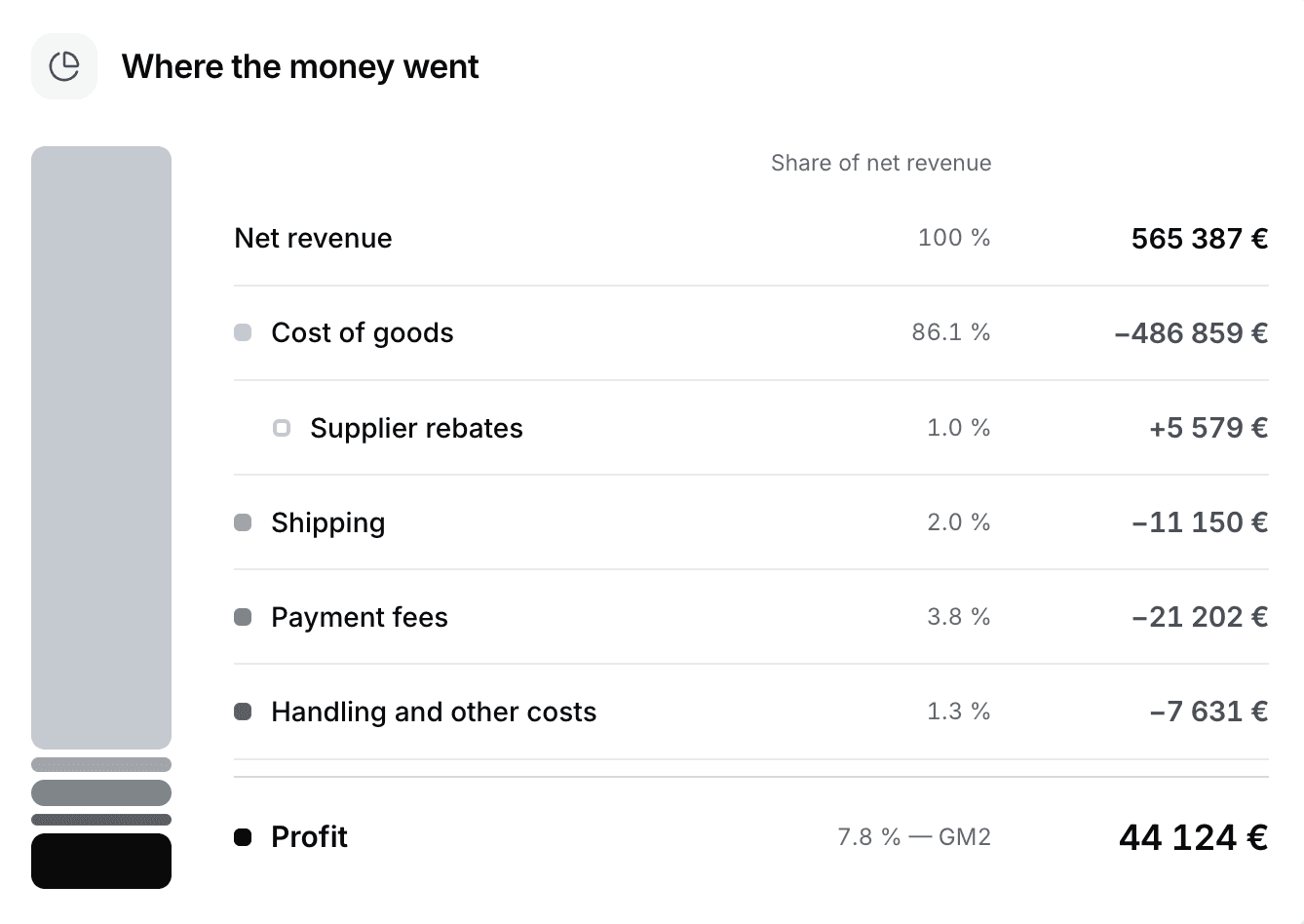
Calculated per line item, from each product's own costs.
Profit after every cost
COGS, VAT, per-carrier shipping, payment fees and supplier kickbacks, on every order line.
Margin per SKU and per order
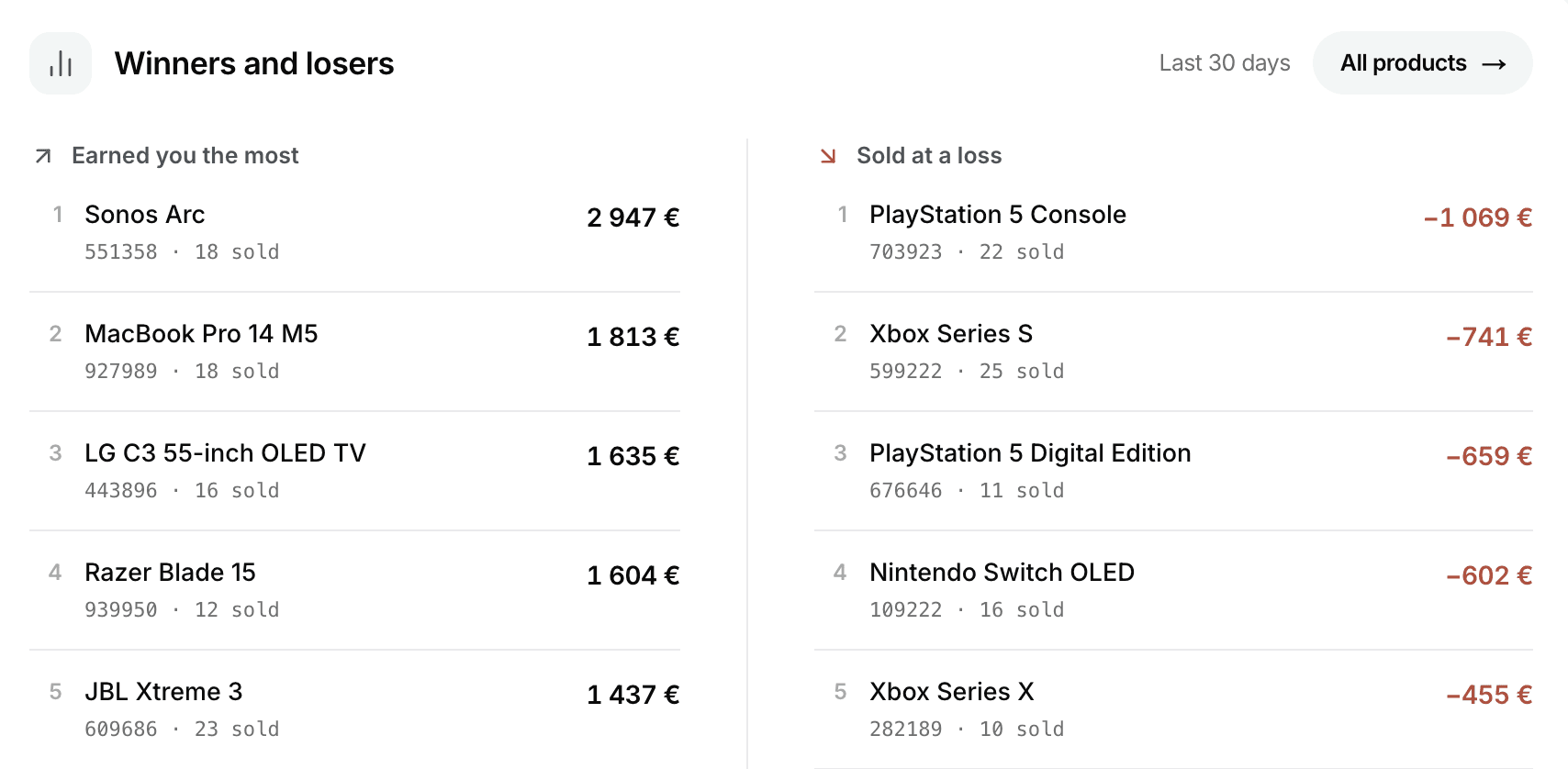
Find out which products are profitable and which ones are driving losses.
Profit by channel
The same source and medium GA4 shows, ranked by profit instead of revenue.
Find out what's losing money
Filter to negative margin orders, orders priced from an estimate, or products your feed does not cover.


what makes it different
Profit, worked out properly
Calculated per line item, from each product's own costs.
Profit after every cost
COGS, VAT, per-carrier shipping, payment fees and supplier kickbacks, on every order line.
Margin per SKU and per order
Find out which products are profitable and which ones are driving losses.
Profit by channel
The same source and medium GA4 shows, ranked by profit instead of revenue.
Find out what's losing money
Filter to negative margin orders, orders priced from an estimate, or products your feed does not cover.
what makes it different
Profit, worked out properly
Calculated per line item, from each product's own costs.
Profit after every cost
COGS, VAT, per-carrier shipping, payment fees and supplier kickbacks, on every order line.
Margin per SKU and per order
Find out which products are profitable and which ones are driving losses.
Profit by channel
The same source and medium GA4 shows, ranked by profit instead of revenue.
Find out what's losing money
Filter to negative margin orders, orders priced from an estimate, or products your feed does not cover.
Integrations
Fits the stack you already run
Profitscaler adds profit to the tools you already use.
" height="12.148632792876796px" id="wGJ4ZGtMI" transform="translate(0.851 0)" width="12.14863279287681px"/><path d="M 0 2.308 C 0 1.034 1.034 0 2.308 0 C 3.583 0 4.617 1.034 4.617 2.308 C 4.617 3.583 3.583 4.617 2.308 4.617 C 1.034 4.617 0 3.583 0 2.308 Z" fill="rgb(242, 5, 5)" height="4.616981016015615px" id="yB8OM6oa7" transform="translate(0 8.383)" width="4.616981016015615px"/></g></svg>)







Nothing to install on your site
Profitscaler runs in your server container, so your storefront stays as it is.
Nothing to install on your site
Profitscaler runs in your server container, so your storefront stays as it is.
Nothing to install on your site
Profitscaler runs in your server container, so your storefront stays as it is.
Your feed, mapped once
Cost prices come from the feed you already maintain, synced every day.
Your feed, mapped once
Cost prices come from the feed you already maintain, synced every day.
Your feed, mapped once
Cost prices come from the feed you already maintain, synced every day.
Profit where the bidding is
Sent to your ad platforms as the conversion value.
Profit where the bidding is
Sent to your ad platforms as the conversion value.
Profit where the bidding is
Sent to your ad platforms as the conversion value.
Reporting stays yours
Profit per order, SKU and traffic channel, in your BI tools.
Reporting stays yours
Profit per order, SKU and traffic channel, in your BI tools.
Activation
Profit bidding is not the only answer
Often it’s the right one, but it depends on your data. Margin projection is the alternative.

The same number at every level
Order profit is the sum of its line items, to the cent, so a losing product inside a profitable order shows up.

Segment the Shopping feed
Projected margin per product, in a custom label feed for Merchant Center. Make your campaigns stop pushing what loses money.

Send profit as the conversion value
Google bids on profit instead of revenue. It is the most direct route, with the highest risk and reward.
The same number at every level
Order profit is the sum of its line items, to the cent, so a losing product inside a profitable order shows up.
Segment the Shopping feed
Projected margin per product, in a custom label feed for Merchant Center. Make your campaigns stop pushing what loses money.
Send profit as the conversion value
Google bids on profit instead of revenue. It is the most direct route, with the highest risk and reward.
Security
Your margins stay yours
Margin data might be the most sensitive number in e-commerce. We treat it that way.
Per-client keys
Own access keys per store, rotatable in minutes.
Per-client keys
Own access keys per store, rotatable in minutes.
Per-client keys
Own access keys per store, rotatable in minutes.
No in-browser exposure
Calculated server-side. No client-side leaks.
No in-browser exposure
Calculated server-side. No client-side leaks.
No in-browser exposure
Calculated server-side. No client-side leaks.
EU-hosted
Our servers are located in the EU.
EU-hosted
Our servers are located in the EU.
EU-hosted
Our servers are located in the EU.
No lock-in
Everything keeps working.
No lock-in
Everything keeps working.
No lock-in
Everything keeps working.
Pricing
Pricing that doesn’t punish a good month
Every feature is included and extra markets cost nothing. The price depends only on your orders per month.
500
orders / mo
500
1k
2.5k
5k
10k
25k
50k
100k
Orders granted, every month
500
Price per order
€0.17
Effective per order, annual
€0.1417
€0.1417
€0.1417
Extra orders bill in blocks of
50
Cost per market or domain
€0
€85
/mo
€850
a year (two months free)
Annual grants the whole year’s orders upfront.
First 500 orders free · no card
Unused orders roll over for the entire length of your subscription.
Frequently asked questions
Can’t find what you’re looking for? Reach out to our team:
General
Getting started
Pricing & billing
Integrations
Security & privacy
Data & accuracy
What is Profitscaler?
Profitscaler calculates the true profit of every order, after cost of goods, VAT, shipping, payment fees and handling, and sends it to the ad and reporting tools e-commerce stores use.
Your server-side container asks us what an order was worth at the moment it happens, and we answer in the few hundred milliseconds it is willing to wait. The number goes to ad platforms like Google Ads, analytics like GA4 as a value on the event, and to your own reporting as a CSV export.
Who is it for?
Profitscaler is for e-commerce stores that run server-side tracking. Both online retailers and D2C brands are supported.
If you have neither a server-side container nor any idea of your margins, then Profitscaler is not for you just yet. If all you're missing is server-side tracking, reach out to us and we'll help you get started through our agency business Nordscale.
Do I have to bid on profit to use this?
No, profit bidding is not required. Profitscaler measures profit whether or not you bid on it, and we would rather you decided the bidding question after seeing your own numbers.
Measuring honestly and choosing what to bid on are two separate decisions. Sending profit straight in as conversion value is right for some stores and wrong for others.
Does this replace my analytics or reporting?
No. Profitscaler adds to your existing stack instead of replacing it. Profit goes into the tools you already use: Google Ads, GA4, Merchant Center and your own BI tool.
Profitscaler does have an overview with a dashboard which is helpful for some, but for advanced users automated data exports will be the primary reporting workflow.
Do I have to change my website or checkout?
No. Profitscaler changes nothing on your website or checkout, because everything happens server-side, after the purchase event has already left the browser. Nothing is added to your storefront, so nothing can slow a page down or break at a theme update.
Who is behind Profitscaler?
Profitscaler is built by Nordscale, a Swedish performance marketing agency. The two brands trade under the same legal entity but are otherwise kept separate.
Frequently asked questions
Can’t find what you’re looking for? Reach out to our team:
General
Getting started
Pricing & billing
Integrations
Security & privacy
Data & accuracy
What is Profitscaler?
Profitscaler calculates the true profit of every order, after cost of goods, VAT, shipping, payment fees and handling, and sends it to the ad and reporting tools e-commerce stores use.
Your server-side container asks us what an order was worth at the moment it happens, and we answer in the few hundred milliseconds it is willing to wait. The number goes to ad platforms like Google Ads, analytics like GA4 as a value on the event, and to your own reporting as a CSV export.
Who is it for?
Profitscaler is for e-commerce stores that run server-side tracking. Both online retailers and D2C brands are supported.
If you have neither a server-side container nor any idea of your margins, then Profitscaler is not for you just yet. If all you're missing is server-side tracking, reach out to us and we'll help you get started through our agency business Nordscale.
Do I have to bid on profit to use this?
No, profit bidding is not required. Profitscaler measures profit whether or not you bid on it, and we would rather you decided the bidding question after seeing your own numbers.
Measuring honestly and choosing what to bid on are two separate decisions. Sending profit straight in as conversion value is right for some stores and wrong for others.
Does this replace my analytics or reporting?
No. Profitscaler adds to your existing stack instead of replacing it. Profit goes into the tools you already use: Google Ads, GA4, Merchant Center and your own BI tool.
Profitscaler does have an overview with a dashboard which is helpful for some, but for advanced users automated data exports will be the primary reporting workflow.
Do I have to change my website or checkout?
No. Profitscaler changes nothing on your website or checkout, because everything happens server-side, after the purchase event has already left the browser. Nothing is added to your storefront, so nothing can slow a page down or break at a theme update.
Who is behind Profitscaler?
Profitscaler is built by Nordscale, a Swedish performance marketing agency. The two brands trade under the same legal entity but are otherwise kept separate.
Frequently asked questions
Can’t find what you’re looking for? Reach out to our team:
What is Profitscaler?
Profitscaler calculates the true profit of every order, after cost of goods, VAT, shipping, payment fees and handling, and sends it to the ad and reporting tools e-commerce stores use.
Your server-side container asks us what an order was worth at the moment it happens, and we answer in the few hundred milliseconds it is willing to wait. The number goes to ad platforms like Google Ads, analytics like GA4 as a value on the event, and to your own reporting as a CSV export.
Who is it for?
Profitscaler is for e-commerce stores that run server-side tracking. Both online retailers and D2C brands are supported.
If you have neither a server-side container nor any idea of your margins, then Profitscaler is not for you just yet. If all you're missing is server-side tracking, reach out to us and we'll help you get started through our agency business Nordscale.
Do I have to bid on profit to use this?
No, profit bidding is not required. Profitscaler measures profit whether or not you bid on it, and we would rather you decided the bidding question after seeing your own numbers.
Measuring honestly and choosing what to bid on are two separate decisions. Sending profit straight in as conversion value is right for some stores and wrong for others.
Does this replace my analytics or reporting?
No. Profitscaler adds to your existing stack instead of replacing it. Profit goes into the tools you already use: Google Ads, GA4, Merchant Center and your own BI tool.
Profitscaler does have an overview with a dashboard which is helpful for some, but for advanced users automated data exports will be the primary reporting workflow.
Do I have to change my website or checkout?
No. Profitscaler changes nothing on your website or checkout, because everything happens server-side, after the purchase event has already left the browser. Nothing is added to your storefront, so nothing can slow a page down or break at a theme update.
Who is behind Profitscaler?
Profitscaler is built by Nordscale, a Swedish performance marketing agency. The two brands trade under the same legal entity but are otherwise kept separate.
" height="14.485182300920405px" id="QmZakoZNz" transform="translate(1.015 0)" width="14.48518230092041px"/><path d="M 0 2.752 C 0 1.232 1.232 0 2.752 0 C 4.273 0 5.505 1.232 5.505 2.752 C 5.505 4.273 4.273 5.505 2.752 5.505 C 1.232 5.505 0 4.273 0 2.752 Z" fill="rgb(242, 5, 5)" height="5.504966100884035px" id="zP0DJFU8o" transform="translate(0 9.995)" width="5.504966100884033px"/></g><path d="M 0 9.069 L 0 0.167 L 3.507 0.167 C 4.176 0.167 4.752 0.289 5.234 0.532 C 5.72 0.771 6.092 1.111 6.352 1.553 C 6.614 1.992 6.746 2.509 6.746 3.107 C 6.746 3.7 6.612 4.218 6.345 4.66 C 6.082 5.098 5.706 5.439 5.216 5.681 C 4.73 5.925 4.151 6.046 3.477 6.046 L 1.064 6.046 L 1.064 4.517 L 3.34 4.517 C 3.675 4.517 3.959 4.459 4.194 4.343 C 4.434 4.228 4.615 4.065 4.738 3.854 C 4.866 3.638 4.929 3.389 4.929 3.107 C 4.929 2.816 4.866 2.567 4.738 2.36 C 4.615 2.153 4.434 1.991 4.194 1.876 C 3.959 1.76 3.675 1.702 3.34 1.702 L 1.834 1.702 L 1.834 9.069 Z M 7.235 9.069 L 7.235 2.676 L 8.938 2.676 L 8.938 3.776 L 8.968 3.776 C 9.083 3.385 9.269 3.096 9.523 2.909 C 9.782 2.718 10.115 2.622 10.521 2.622 C 10.625 2.622 10.72 2.627 10.808 2.635 C 10.9 2.639 10.981 2.645 11.053 2.652 L 11.053 4.17 C 10.985 4.162 10.878 4.154 10.73 4.146 C 10.587 4.134 10.442 4.128 10.294 4.128 C 10.047 4.128 9.824 4.184 9.625 4.295 C 9.43 4.407 9.276 4.57 9.165 4.786 C 9.054 4.996 8.998 5.257 8.998 5.568 L 8.998 9.069 Z M 14.261 9.213 C 13.616 9.213 13.052 9.073 12.57 8.795 C 12.088 8.516 11.712 8.127 11.441 7.629 C 11.174 7.132 11.041 6.55 11.041 5.885 C 11.041 5.215 11.174 4.632 11.441 4.134 C 11.712 3.632 12.088 3.242 12.57 2.963 C 13.052 2.685 13.616 2.545 14.261 2.545 C 14.907 2.545 15.47 2.685 15.952 2.963 C 16.434 3.242 16.809 3.632 17.075 4.134 C 17.346 4.632 17.481 5.215 17.481 5.885 C 17.481 6.55 17.346 7.132 17.075 7.63 C 16.809 8.127 16.434 8.516 15.952 8.795 C 15.47 9.073 14.907 9.213 14.261 9.213 Z M 14.261 7.785 C 14.556 7.785 14.809 7.707 15.02 7.552 C 15.235 7.397 15.4 7.178 15.515 6.894 C 15.635 6.608 15.695 6.271 15.695 5.885 C 15.695 5.49 15.635 5.152 15.516 4.869 C 15.4 4.583 15.235 4.362 15.02 4.206 C 14.809 4.051 14.556 3.973 14.262 3.973 C 13.971 3.973 13.718 4.05 13.502 4.206 C 13.287 4.361 13.12 4.582 13.001 4.869 C 12.885 5.152 12.827 5.491 12.827 5.885 C 12.827 6.271 12.885 6.608 13.001 6.894 C 13.12 7.178 13.287 7.397 13.502 7.552 C 13.718 7.707 13.97 7.785 14.261 7.785 Z M 21.735 2.676 L 21.735 4.057 L 17.505 4.057 L 17.505 2.676 Z M 18.658 9.069 L 18.658 1.924 C 18.658 1.513 18.738 1.173 18.897 0.902 C 19.057 0.627 19.292 0.42 19.602 0.281 C 19.913 0.141 20.29 0.071 20.732 0.071 C 20.959 0.071 21.172 0.077 21.371 0.09 C 21.57 0.097 21.711 0.105 21.795 0.113 L 21.723 1.494 C 21.668 1.485 21.578 1.479 21.454 1.475 C 21.331 1.471 21.221 1.469 21.126 1.469 C 20.871 1.469 20.69 1.525 20.582 1.637 C 20.475 1.748 20.421 1.925 20.421 2.168 L 20.421 9.069 Z M 22.231 9.069 L 22.231 2.676 L 23.993 2.676 L 23.993 9.069 Z M 23.109 1.87 C 22.823 1.87 22.584 1.78 22.392 1.601 C 22.205 1.422 22.111 1.199 22.111 0.932 C 22.111 0.665 22.205 0.444 22.392 0.269 C 22.583 0.09 22.822 0 23.109 0 C 23.396 0 23.635 0.09 23.826 0.269 C 24.017 0.444 24.113 0.665 24.113 0.932 C 24.113 1.199 24.017 1.422 23.826 1.601 C 23.635 1.78 23.396 1.87 23.109 1.87 Z M 28.468 2.677 L 28.468 4.056 L 24.364 4.056 L 24.364 2.677 Z M 25.415 0.986 L 27.184 0.986 L 27.184 7.121 C 27.184 7.333 27.228 7.482 27.315 7.57 C 27.403 7.653 27.564 7.695 27.799 7.695 L 28.14 7.695 C 28.275 7.691 28.379 7.687 28.45 7.683 L 28.504 9.058 C 28.381 9.069 28.221 9.077 28.026 9.081 C 27.835 9.085 27.644 9.087 27.453 9.087 C 26.764 9.087 26.252 8.946 25.917 8.663 C 25.582 8.38 25.415 7.948 25.415 7.367 Z M 31.491 9.218 C 30.95 9.218 30.466 9.137 30.04 8.974 C 29.617 8.806 29.277 8.567 29.018 8.257 C 28.763 7.942 28.614 7.564 28.57 7.121 L 30.284 7.056 C 30.328 7.339 30.452 7.558 30.655 7.713 C 30.858 7.868 31.133 7.946 31.479 7.946 C 31.81 7.946 32.069 7.884 32.256 7.761 C 32.447 7.633 32.543 7.472 32.543 7.277 C 32.543 7.109 32.471 6.974 32.328 6.871 C 32.188 6.763 31.985 6.683 31.718 6.632 L 30.601 6.411 C 29.984 6.287 29.516 6.07 29.197 5.759 C 28.878 5.449 28.719 5.05 28.719 4.564 C 28.719 4.158 28.829 3.806 29.048 3.507 C 29.271 3.204 29.583 2.971 29.985 2.808 C 30.392 2.64 30.87 2.557 31.419 2.557 C 31.961 2.557 32.433 2.64 32.836 2.808 C 33.238 2.975 33.554 3.212 33.785 3.519 C 34.016 3.826 34.146 4.19 34.174 4.612 L 32.555 4.672 C 32.535 4.425 32.427 4.222 32.232 4.062 C 32.037 3.899 31.782 3.818 31.467 3.818 C 31.165 3.818 30.924 3.881 30.744 4.009 C 30.565 4.132 30.476 4.29 30.476 4.481 C 30.476 4.648 30.543 4.785 30.679 4.893 C 30.814 4.996 31.009 5.076 31.264 5.132 L 32.465 5.365 C 33.103 5.492 33.573 5.7 33.875 5.986 C 34.182 6.269 34.335 6.644 34.335 7.109 C 34.335 7.536 34.214 7.906 33.971 8.221 C 33.732 8.536 33.397 8.781 32.967 8.956 C 32.541 9.131 32.049 9.219 31.491 9.219 Z M 37.788 9.213 C 37.147 9.213 36.587 9.073 36.109 8.795 C 35.631 8.512 35.259 8.121 34.992 7.624 C 34.729 7.122 34.598 6.542 34.598 5.885 C 34.598 5.224 34.729 4.642 34.992 4.14 C 35.259 3.638 35.631 3.248 36.11 2.969 C 36.587 2.686 37.147 2.545 37.789 2.545 C 38.199 2.545 38.577 2.605 38.924 2.724 C 39.27 2.844 39.573 3.011 39.832 3.226 C 40.095 3.441 40.304 3.698 40.459 3.997 C 40.618 4.295 40.716 4.626 40.752 4.989 L 39.055 5.054 C 39.031 4.891 38.985 4.744 38.918 4.612 C 38.85 4.477 38.762 4.361 38.655 4.266 C 38.551 4.17 38.428 4.096 38.284 4.045 C 38.145 3.993 37.988 3.967 37.812 3.967 C 37.51 3.967 37.253 4.047 37.042 4.206 C 36.831 4.361 36.667 4.582 36.552 4.869 C 36.44 5.156 36.385 5.494 36.385 5.885 C 36.385 6.267 36.44 6.602 36.552 6.889 C 36.667 7.175 36.831 7.398 37.042 7.558 C 37.253 7.713 37.51 7.791 37.812 7.791 C 37.988 7.791 38.145 7.765 38.284 7.713 C 38.424 7.661 38.545 7.588 38.649 7.492 C 38.752 7.392 38.838 7.275 38.906 7.14 C 38.973 7.004 39.023 6.851 39.055 6.679 L 40.758 6.751 C 40.726 7.114 40.632 7.444 40.477 7.743 C 40.322 8.042 40.113 8.301 39.85 8.519 C 39.587 8.739 39.28 8.91 38.929 9.033 C 38.583 9.153 38.203 9.213 37.788 9.213 Z M 43.309 9.183 C 42.891 9.183 42.516 9.113 42.186 8.974 C 41.859 8.83 41.6 8.617 41.409 8.334 C 41.221 8.048 41.128 7.693 41.128 7.271 C 41.128 6.909 41.194 6.608 41.325 6.369 C 41.457 6.13 41.638 5.939 41.869 5.795 C 42.1 5.648 42.365 5.536 42.663 5.46 C 42.962 5.381 43.275 5.325 43.602 5.294 C 43.988 5.257 44.294 5.222 44.522 5.186 C 44.753 5.15 44.918 5.098 45.017 5.031 C 45.121 4.959 45.173 4.855 45.173 4.72 L 45.173 4.684 C 45.173 4.516 45.131 4.373 45.047 4.254 C 44.968 4.134 44.85 4.041 44.695 3.973 C 44.543 3.906 44.358 3.872 44.139 3.872 C 43.92 3.872 43.727 3.906 43.56 3.973 C 43.392 4.04 43.259 4.136 43.159 4.26 C 43.064 4.379 43.004 4.519 42.98 4.678 L 41.325 4.618 C 41.373 4.192 41.516 3.826 41.755 3.519 C 41.995 3.212 42.319 2.975 42.729 2.808 C 43.14 2.64 43.623 2.557 44.181 2.557 C 44.595 2.557 44.972 2.605 45.31 2.7 C 45.649 2.796 45.938 2.937 46.177 3.125 C 46.419 3.308 46.605 3.535 46.732 3.806 C 46.859 4.076 46.923 4.389 46.923 4.744 L 46.923 9.069 L 45.209 9.069 L 45.209 8.173 L 45.179 8.173 C 45.067 8.376 44.928 8.554 44.76 8.705 C 44.593 8.856 44.39 8.974 44.151 9.058 C 43.916 9.141 43.635 9.183 43.309 9.183 Z M 43.798 7.952 C 44.082 7.952 44.327 7.9 44.533 7.797 C 44.744 7.689 44.906 7.544 45.017 7.361 C 45.129 7.177 45.184 6.972 45.184 6.745 L 45.184 6.094 C 45.133 6.122 45.063 6.15 44.975 6.178 C 44.888 6.201 44.786 6.225 44.671 6.249 C 44.555 6.273 44.432 6.297 44.301 6.321 L 43.906 6.38 C 43.703 6.413 43.518 6.462 43.35 6.53 C 43.187 6.594 43.058 6.683 42.962 6.799 C 42.867 6.91 42.819 7.052 42.819 7.223 C 42.819 7.375 42.859 7.506 42.938 7.618 C 43.022 7.725 43.137 7.809 43.285 7.869 C 43.432 7.924 43.604 7.952 43.798 7.952 Z M 49.54 0.167 L 49.54 9.069 L 47.777 9.069 L 47.777 0.167 Z M 53.304 9.213 C 52.655 9.213 52.091 9.071 51.613 8.789 C 51.135 8.506 50.765 8.115 50.502 7.618 C 50.243 7.116 50.113 6.538 50.113 5.885 C 50.113 5.232 50.245 4.654 50.508 4.152 C 50.775 3.65 51.141 3.258 51.607 2.975 C 52.077 2.688 52.621 2.545 53.238 2.545 C 53.696 2.545 54.114 2.623 54.493 2.778 C 54.871 2.933 55.198 3.156 55.472 3.447 C 55.751 3.734 55.966 4.08 56.118 4.487 C 56.27 4.889 56.345 5.341 56.345 5.843 L 56.345 6.321 L 50.765 6.321 L 50.765 5.198 L 55.491 5.198 L 54.69 5.473 C 54.69 5.146 54.632 4.865 54.517 4.63 C 54.405 4.395 54.244 4.214 54.033 4.086 C 53.822 3.955 53.567 3.889 53.268 3.889 C 52.973 3.889 52.718 3.955 52.504 4.086 C 52.292 4.214 52.129 4.395 52.013 4.63 C 51.898 4.861 51.84 5.136 51.84 5.454 L 51.84 6.231 C 51.84 6.57 51.9 6.863 52.02 7.11 C 52.139 7.357 52.312 7.548 52.539 7.683 C 52.766 7.815 53.037 7.881 53.352 7.881 C 53.575 7.881 53.774 7.849 53.949 7.785 C 54.128 7.721 54.278 7.629 54.397 7.51 C 54.521 7.386 54.61 7.243 54.666 7.08 L 56.273 7.151 C 56.19 7.558 56.01 7.916 55.736 8.227 C 55.461 8.534 55.114 8.775 54.696 8.95 C 54.278 9.125 53.814 9.213 53.304 9.213 Z M 56.895 9.069 L 56.895 2.676 L 58.597 2.676 L 58.597 3.776 L 58.628 3.776 C 58.743 3.385 58.928 3.096 59.183 2.909 C 59.442 2.718 59.774 2.622 60.18 2.622 C 60.284 2.622 60.38 2.627 60.467 2.635 C 60.559 2.639 60.641 2.645 60.712 2.652 L 60.712 4.17 C 60.645 4.162 60.537 4.154 60.39 4.146 C 60.246 4.134 60.101 4.128 59.954 4.128 C 59.707 4.128 59.483 4.184 59.284 4.295 C 59.089 4.407 58.936 4.57 58.824 4.786 C 58.713 4.996 58.657 5.257 58.657 5.568 L 58.657 9.069 Z" fill="rgb(255, 255, 255)" height="9.21894823509356px" id="lMgIORD5r" transform="translate(19.288 3.18)" width="60.71243126584551px"/></g></svg>)
Find out what your orders are actually worth
Track 500 orders for free. No credit card required.

Find out what your orders are actually worth
Track 500 orders for free. No credit card required.
Find out what your orders are actually worth
Track 500 orders for free. No credit card required.